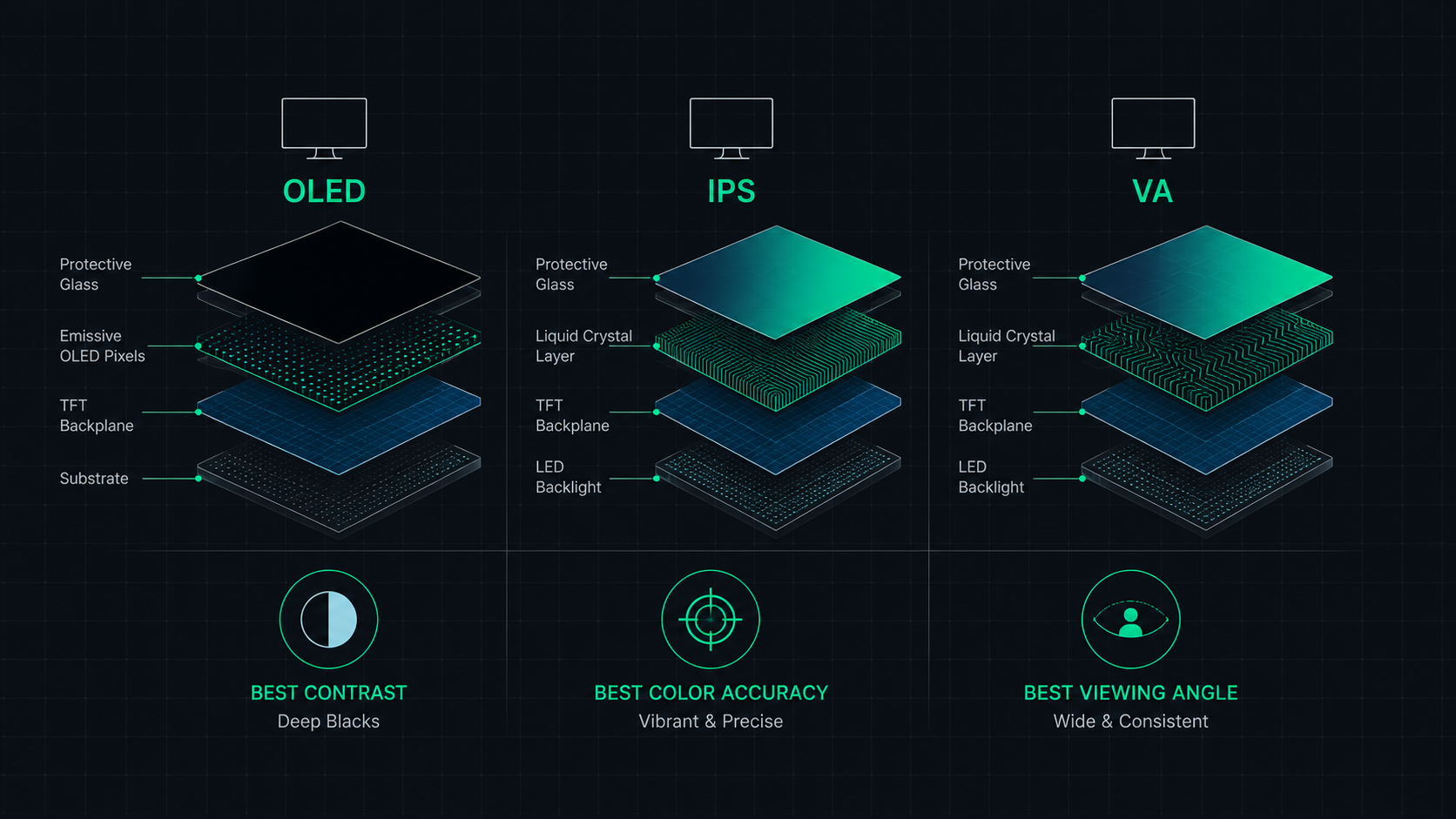
Complete comparison of OLED, IPS, and VA monitor panel technologies for gaming, creative work, and everyday use. Understand the trade-offs of contrast, color accuracy, response time, and burn-in risk to make the right choice in 2026.
The Quick Answer
For most gamers: OLED for premium quality, IPS for reliability and value. For creative professionals: IPS or high-end OLED. For dark-room movie watching: VA or OLED. On a budget: IPS.
Panel Technology Overview
IPS (In-Plane Switching)
IPS panels align liquid crystals horizontally and rotate them to control the amount of light passing through. This design produces wide viewing angles (up to 178°) and excellent color consistency that doesn't shift based on your viewing angle.
VA (Vertical Alignment)
VA panels align liquid crystals vertically when at rest, producing near-perfect black levels when pixels are "off." This gives VA monitors a significant contrast advantage — typically 2500:1 to 5000:1 versus 1000:1 for IPS. The trade-off is narrower viewing angles and historically slower response times.
OLED (Organic Light-Emitting Diode)
OLED completely changes the display architecture — there is no backlight. Each pixel generates its own light independently. When a pixel needs to be black, it simply turns off completely, producing true perfect blacks and infinite contrast. OLED also has near-instantaneous pixel response times because no liquid crystal rotation is required.
Comprehensive Panel Comparison
| Feature | IPS | VA | OLED |
|---|---|---|---|
| Contrast Ratio | ~1000:1 | ~3000–5000:1 | Infinite (perfect blacks) |
| Black Level | Grey blacks | Deep blacks | True black (pixel off) |
| Color Accuracy | Excellent | Good | Outstanding |
| Viewing Angles | Wide (178°) | Moderate (178° spec, real-world less) | Wide (178°) |
| Response Time | 1–5ms GtG | 2–8ms GtG | <0.1ms GtG |
| Refresh Rate (max) | Up to 500Hz | Up to 240Hz | Up to 480Hz |
| HDR Performance | Good (with FALD) | Better (deep blacks) | Outstanding |
| Burn-in Risk | None | None | Low-Moderate (static content) |
| Price Range | $150–$800 | $200–$600 | $500–$2,000+ |
| Best For | Work, gaming, color accuracy | Movies, dark gaming, budget HDR | Premium gaming, professionals |
IPS Panels: The Reliable All-Rounder
IPS remains the most popular panel type for good reason — it offers a well-balanced combination of color accuracy, viewing angles, and response times at a wide range of price points. For most users doing a mix of gaming, productivity, and creative work, a quality IPS monitor delivers excellent results without the price premium or burn-in concerns of OLED.
Choose IPS if: You need reliable color accuracy, wide viewing angles, zero burn-in risk, and a broad selection of refresh rates and sizes at reasonable prices.
VA Panels: The Contrast King
VA panels shine in scenarios where deep blacks matter most — dark-themed games, movies, and content with high dynamic range. A VA monitor's contrast ratio of 3000:1 versus IPS's 1000:1 produces blacks that look noticeably deeper and more cinematic. The trade-off: some VA panels show "smearing" or ghosting in fast-motion scenes due to their slower pixel response times, though newer Fast VA panels have significantly reduced this issue.
Choose VA if: You watch lots of movies, play games in a dark room, and want the best contrast without paying OLED prices.
OLED Panels: The Premium Choice
OLED represents the current pinnacle of display technology for monitors. Perfect blacks, infinite contrast, near-instant response times, and outstanding color accuracy combine to create an unmatched visual experience. In 2025–2026, QD-OLED panels (used in monitors like the Samsung Odyssey OLED G8 and Alienware 34 QD-OLED) add quantum dot color enhancement, pushing color volume even further.
The burn-in question: Modern OLED monitors include sophisticated burn-in mitigation — pixel shifting, automatic brightness limiting, logo detection, and periodic pixel refreshes. For typical gaming and work use, burn-in is unlikely to be a problem in the first 3–5 years of use. Static content displayed for thousands of hours (taskbars, news tickers, desktop icons) poses greater risk.
Choose OLED if: You want the best possible image quality, you primarily game or do creative work, and you are willing to pay a premium for the experience.
Panel Type by Use Case
| Use Case | Recommended Panel | Reason |
|---|---|---|
| Competitive Gaming | IPS (Fast IPS) | High refresh rates, fast response, reliable |
| Cinematic / Single-player Gaming | OLED or VA | Perfect blacks enhance atmosphere |
| Photo Editing | IPS or OLED | Wide color gamut, accurate sRGB/DCI-P3 |
| Video Editing | OLED or IPS | Color accuracy + contrast for grades |
| Office / Productivity | IPS | Comfortable all-day viewing, wide angles |
| Movie Watching | OLED or VA | Deep blacks, high contrast |
| Budget Gaming | IPS or VA | Affordable 144Hz options available |
Test Your Monitor's Display Quality
Use our Dead Pixel Test to check your panel for defects, or our Monitor Comparison Tool to compare specific models side-by-side.
ScreenInspector Editorial & Hardware Team
Verified Display AnalystWritten and verified by display engineers and hardware analysts. Data is cross-referenced with browser API standards, panel manufacturer datasheets, and physical pixel density metrics.
Frequently Asked Questions
What is the difference between OLED, IPS, and VA panels?
IPS (In-Plane Switching) offers excellent color accuracy and wide viewing angles. VA (Vertical Alignment) offers high contrast ratios and deep blacks. OLED (Organic Light-Emitting Diode) offers perfect blacks, infinite contrast, and ultra-fast response times, but at a higher price and with burn-in risk for static content.
Is OLED better than IPS for gaming?
OLED is technically superior for gaming in most metrics — it has near-instant pixel response times (<0.1ms), infinite contrast ratio, and vibrant HDR. However, OLED monitors cost significantly more and have burn-in risk from static HUD elements if left on-screen for thousands of hours. IPS gaming monitors offer an excellent, burn-in-free alternative.
Does OLED get burn-in?
OLED burn-in is real but manageable in normal gaming use. Most OLED monitors include pixel shifting, automatic brightness limiting, and pixel refresher features to mitigate burn-in. For typical gaming sessions, burn-in typically takes thousands of hours of the same static element. Permanent static content (taskbars, news tickers) poses the greatest risk.
Which panel is best for photo editing?
IPS panels are the traditional choice for photo and video editing due to wide viewing angles, accurate factory color calibration, and consistent color accuracy (typically covering 99% sRGB, 95%+ DCI-P3). High-end OLED monitors now rival IPS for color accuracy while adding superior contrast, making them an increasingly popular choice for professionals.
Is VA panel good for gaming?
VA panels offer the best contrast ratios (typically 2500:1 to 5000:1 vs 1000:1 for IPS), making them excellent for dark-room gaming and movies with cinematic black levels. However, some VA panels exhibit 'pixel smearing' or ghosting in fast-paced games due to slower response times. Fast VA panels for gaming have improved significantly in 2025–2026.